
Working-hours records for small businesses
Employee time tracking, also over WhatsApp
Your team clocks in, takes breaks and clocks out from the mobile app, a computer, a shared terminal at the workplace or by sending a WhatsApp message. You get schedules, holidays, corrections and the monthly PDF report in one place.
No sign-up or card · Sample company ready instantly · Deleted automatically after 48 h
Clock in from
- Mobile app
- Computer
- Phone browser
- Shared terminal


Today
Built for companies like yours
Offices
People clock in from their computer and see their schedule and holidays.
Shops and hospitality
A tablet at the workplace as a terminal: name, PIN, done.
Teams on the move
They clock in with the mobile app or over WhatsApp, with location if you require it.
Several workplaces
Schedules, public holidays and terminals per workplace and department.
How it works
Up and running in three steps
Set up your company
Add your workplaces, schedules and public holidays. Invite each person by email or give them access with their ID number.
Your team clocks in
Through the channels you allow: mobile app, computer, phone browser, shared terminal or WhatsApp. Each entry records where it came from.
Review and get the report
See who is working, approve corrections and, every month, receive last month's time-entries PDF by email.
Clocking in
Everyone clocks in the way that suits them. You decide where from.
Enable only the channels you want for the whole company, with exceptions for specific people.
Mobile app
The Global Horario app for iPhone and Android: clock in, check time entries, request holidays and get notifications on the phone. With location, if the company requires it.
Computer
One button for clock-in, breaks and clock-out, with the time always visible.
Phone browser
From the phone's browser, nothing to install. With location, if the company requires it.
Shared terminal
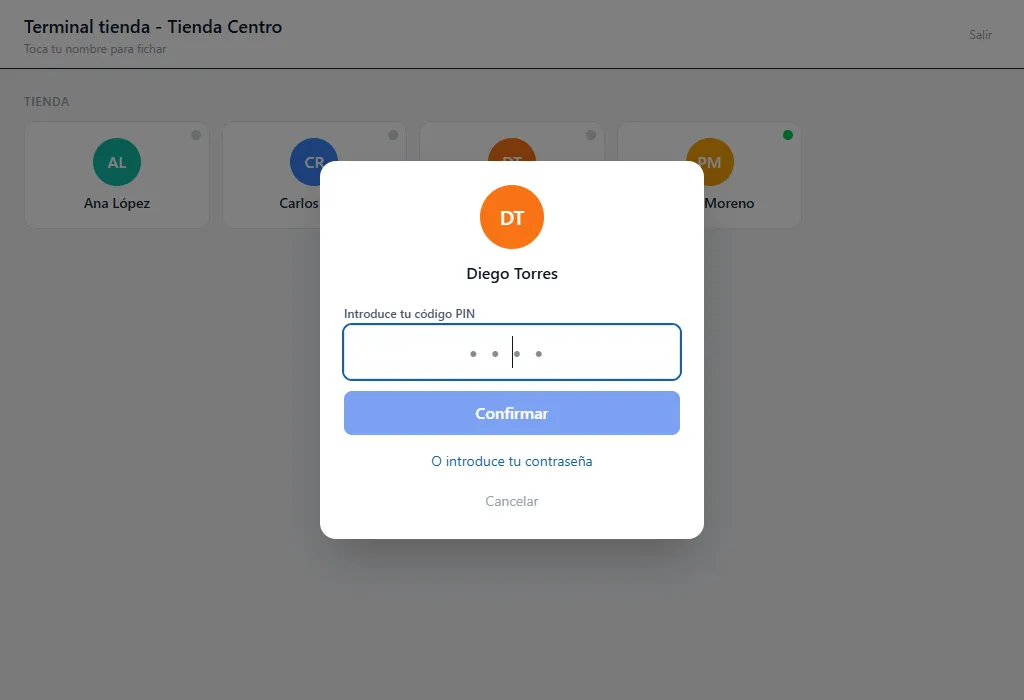
A tablet or computer at the workplace: each person taps their name and enters a 4-digit PIN.
WhatsApp
With the buttons the system sends, or by typing “clock in” or “clock out”.
And you stay in control
Channels per company
Turn the computer, phone, app or WhatsApp channels on or off.
Office only
Restrict clocking in to the company's IP addresses.
Location required
Require the location to be recorded when clocking in.
Per-person exceptions
Different rules for whoever needs them.
Clocking in over WhatsApp
Clocking in is as easy as sending a WhatsApp message
No app to install and no password to remember. The company turns it on, each person links their phone with a code and, from then on, clocks in from the chat.
Clock-in, breaks and clock-out
With buttons that change depending on whether they are working or on a break.
Reminders if they forget
A reminder if they haven't clocked in at the expected time or still have their shift open.
Confirmed schedule changes
They get the new schedule and confirm it or comment on it with one tap.
Quick lookups
Their latest entries and holiday balance, without leaving the chat.
Today
Corrections
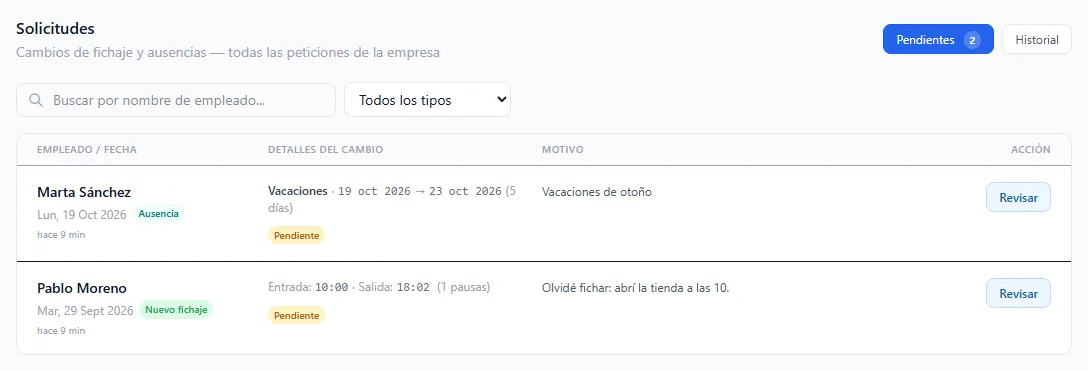
If someone forgets to clock in, it is fixed with a paper trail
Nobody changes a time entry silently. Every change has a reason, someone who approves it, and it is recorded.
The employee requests the change
Add a forgotten entry or correct a time, explaining why.
HR approves or rejects it
From the requests inbox or straight from WhatsApp.
If the company changes it, the employee accepts it
Changes made by an administrator must be accepted by the person affected.
Everything is recorded
The activity log and the PDF show who requested it, who approved it and why.
Schedules
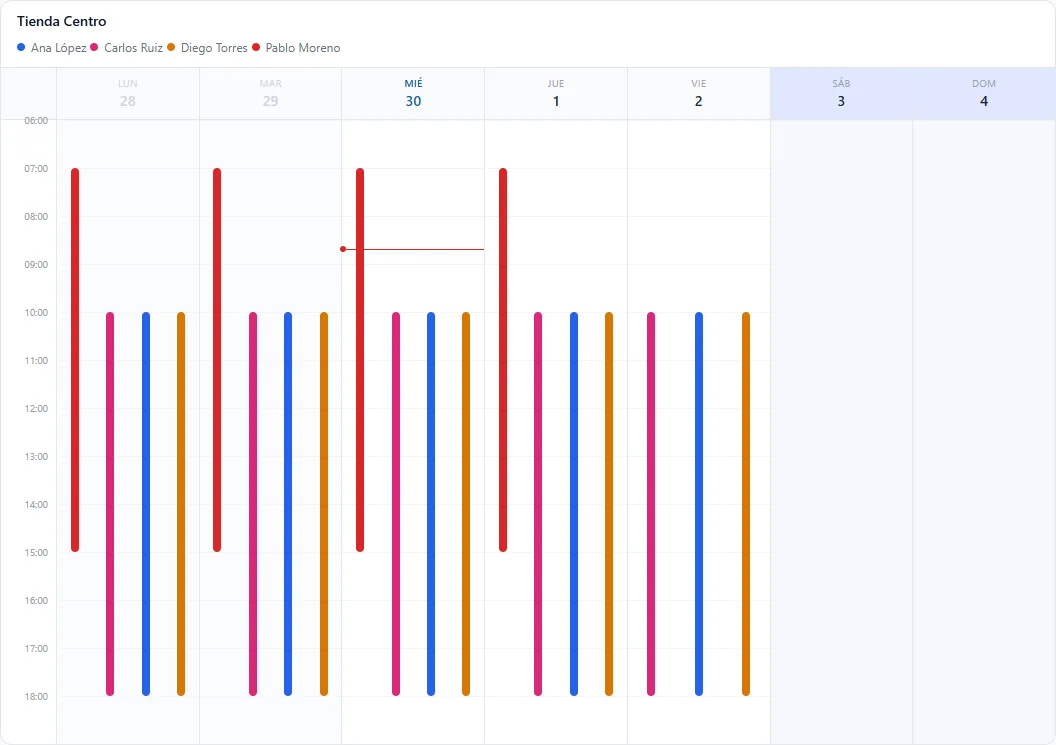
Schedules and shifts that fit the way you work
- Weekly rotating shifts: one week mornings, the next afternoons…
- Fixed breaks or breaks within a window, and different hours per workplace.
- Public holidays for each workplace: official calendars plus your own.
- Schedule changes that employees confirm or comment on.
Holidays and absences
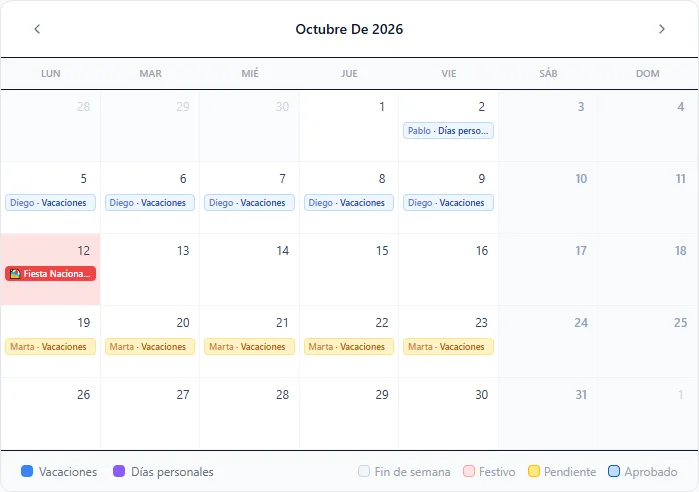
Holidays without spreadsheets
- Everyone requests holidays or personal days, including half days.
- Approve or reject with a comment, and they get notified.
- Up-to-date balances, counted in working or calendar days.
- The whole team in one calendar, filterable by workplace and department.
Hours and reports
Each month's report lands in your inbox
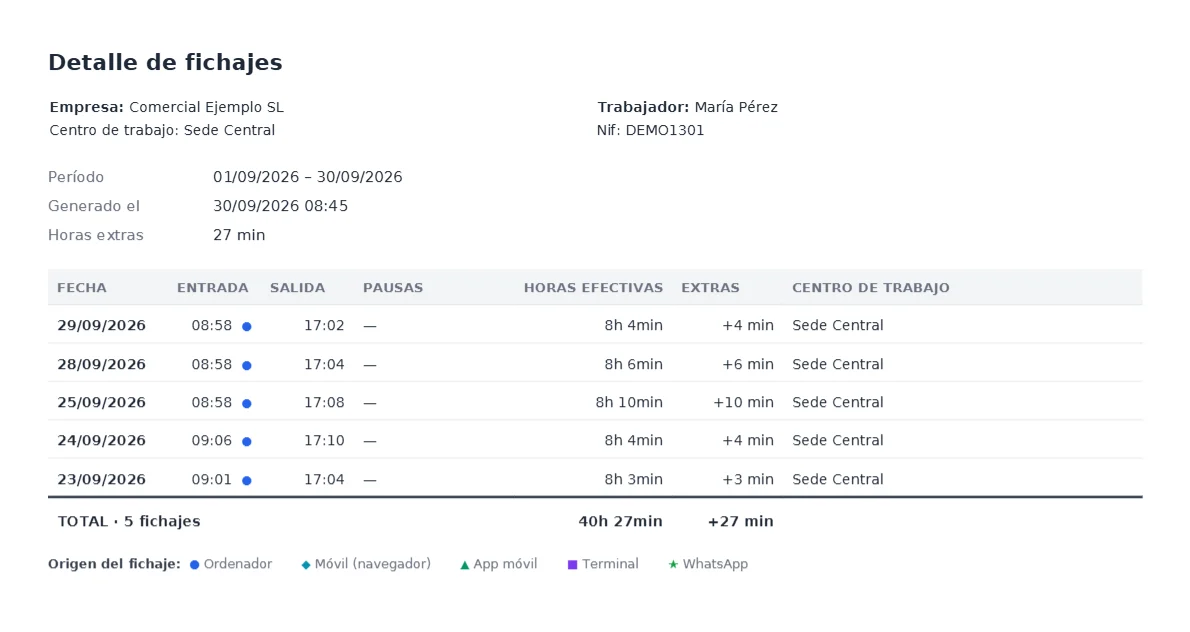
- Time-entry PDFs per employee or for the whole company, by week, month or year.
- Effective hours, breaks, overtime and where each entry came from.
- Overtime that is offset by week, month or year, as you configure it.
- Every month, administrators and HR receive last month's PDF.
For your team
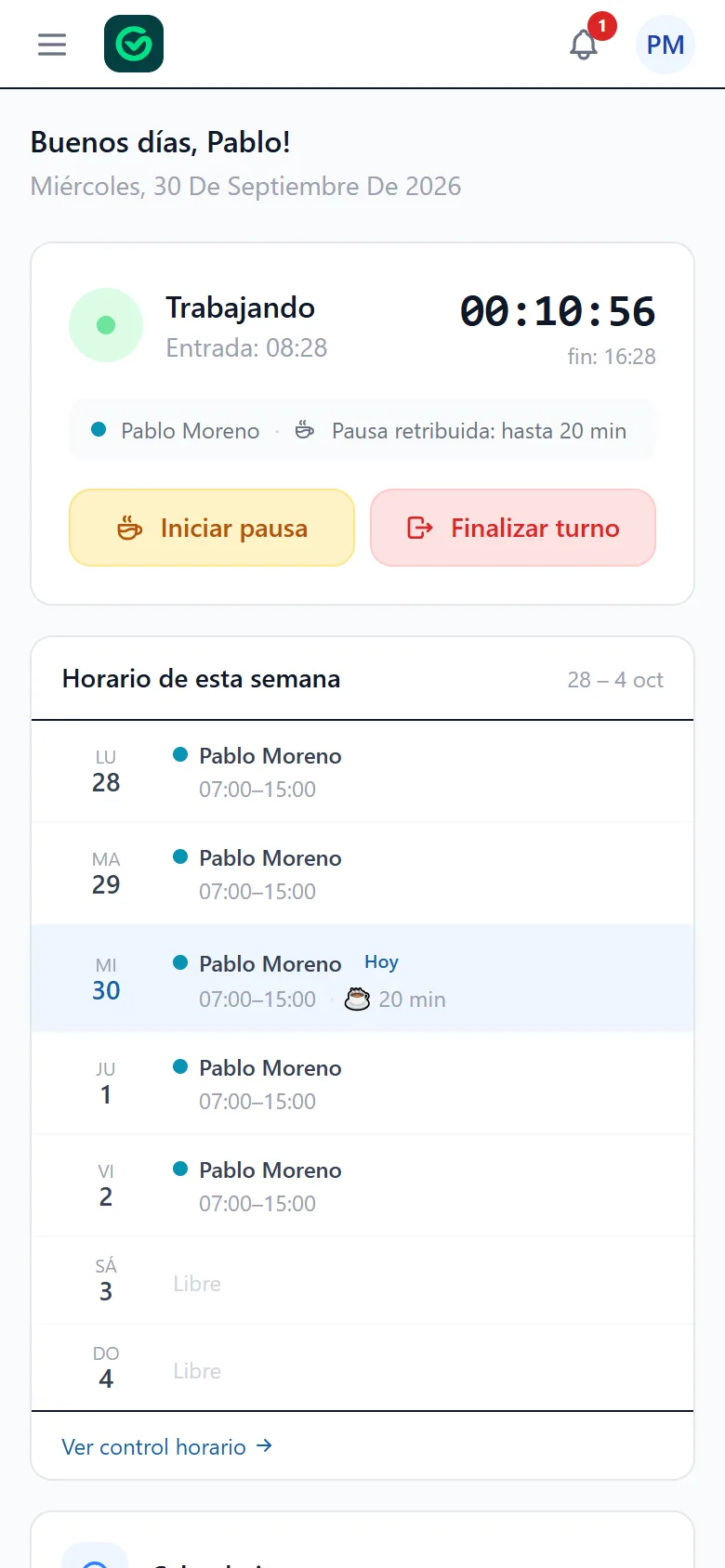
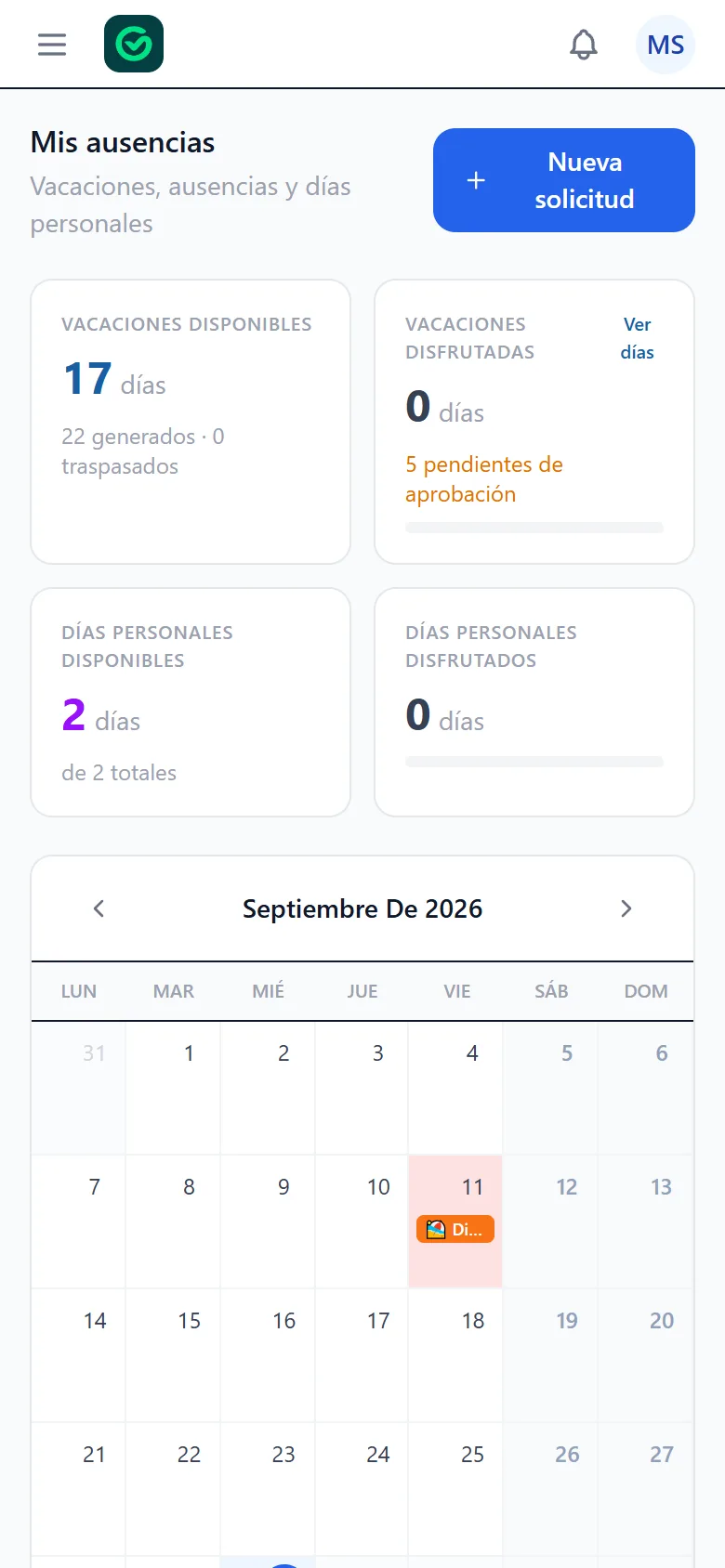
What each employee sees: their schedule, their time entries and their holidays
A clear screen that makes sense at first glance, on the web or in the iPhone and Android app, and in Catalan, Spanish or English.
- Clock in and see how long they have been working.
- Their schedule for the week and upcoming public holidays.
- Their time entries, and a correction request if they make a mistake.
- Request holidays and see how many days are left.
- Their payslips and documents, always at hand.
- Notifications on the phone with the app, by email or WhatsApp.
And also
Documents and payslips
Upload payslips and documents for each person; they download them from their account.
Roles and permissions
Administrator, HR and employee, each with what they need.
Departments and workplaces
Organise your team and filter lists, calendars and reports.
Activity log
History of relevant actions, exportable to PDF.
Notifications
Everyone chooses which notifications they want by email and in the app.
Three languages
Catalan, Spanish and English, on WhatsApp too.
Mobile app
Also as an app for iPhone and Android
Clock in, check time entries, request holidays, see payslips and get notifications on the phone from the Global Horario app. Free to download.
Pricing
Clear pricing, based on the size of your team
Monthly prices per company, excluding VAT.
€19/month
Up to 4 users
+ €2.50 per month for each additional user
Your price: €34 per month + VAT
€19 + 6 users × €2.50
Questions about your case? Write to us and we'll explain. info@globalhorario.com · WhatsApp 645 39 61 06
Payroll and HR advisors
Do you manage HR for other companies?
Offer time tracking to your clients under your own brand.
- Your domain, logo and colours: your clients only see your brand.
- One panel to manage all your clients' companies.
- Enable only the modules each client needs.
- Invoice your clients for the service from the same panel.
Who we are
More than 10 years in working-hours records
Global Horario is developed and supported by Matarogroc SL, based in Mataró (Barcelona). For any questions, write to us or call us.
- Phone
- 93 790 36 15
- 645 39 61 06
- Where we are
- Mataró (Barcelona)
FAQ
What people usually ask us
Is recording working hours mandatory in Spain?
Yes. Since May 2019, article 34.9 of the Spanish Workers' Statute requires companies to record the start and end of each employee's working day, every day, and to keep those records for four years.
Do my employees need to install anything?
They don't have to. They can clock in from a computer or phone browser, from a shared terminal at the workplace (a tablet or computer) or over WhatsApp, if the company turns it on. If they prefer, there is also a free app for iPhone and Android.
Is there a mobile app?
Yes, for iPhone and Android: you'll find it on the App Store and Google Play. With it, everyone can clock in, check their time entries and request changes, request holidays, see their documents and payslips and get notifications on their phone. If you don't want people clocking in from the app, you can turn that off and they can keep using it for everything else.
What if someone forgets to clock in?
They can request that the entry be added or corrected, giving a reason, and HR approves or rejects it. With WhatsApp clocking turned on, they can also get a reminder when they haven't clocked in at the expected time or still have their shift open.
Can I stop people clocking in from home?
Yes. You can turn channels off (computer, phone, app or WhatsApp), restrict clocking in to the company's IP addresses or require the location to be recorded when clocking in. You can also make exceptions for specific people.
Can a time entry be changed?
Yes, but it is recorded. Employees request changes with a reason and HR approves them; if the company makes the change, the employee must accept it. The activity log and the PDF show who requested it, who approved it and why.
Does it work with rotating shifts and several workplaces?
Yes. You can set up multi-week schedules that repeat in a loop, assign a workplace to each part of a schedule and choose the public holidays and working days for each workplace and department.
How does clocking in over WhatsApp work?
The company turns it on and each employee links their phone from their account with a verification code. From then on they clock in with the buttons the system sends (clock-in, break and clock-out) and can check their latest entries and holiday balance.
What reports do I get?
Time-entry PDFs per employee or for the whole company, by week, month or year, with effective hours, breaks, overtime and where each entry came from. Every month, administrators and HR also receive last month's PDF by email.
How much does it cost?
€19 per month for up to 4 users, and €2.50 per month for each additional user. Prices exclude VAT.
Does the demo use my data?
No. It creates a sample company with fictitious data, you log in as its administrator and it is deleted automatically after 48 hours. We only ask for a name for the company.
Which languages is it available in?
Catalan, Spanish and English. Everyone chooses their own, and the WhatsApp bot replies in that language.
I'm an HR advisor: can I offer it to my clients?
Yes. You can offer it with your domain, logo and colours, manage your clients' companies from one panel and invoice them for the service. Write to us and we'll explain.
Try it with your team in mind
Open a sample company and clock in, approve a request or download a report. If it fits, write to us and we'll set up your company.
No sign-up or card · Sample company ready instantly · Deleted automatically after 48 h